
What is ‘Nano Banana’ trend? How to use AI to turn pics into 3D figurines? All you need to know
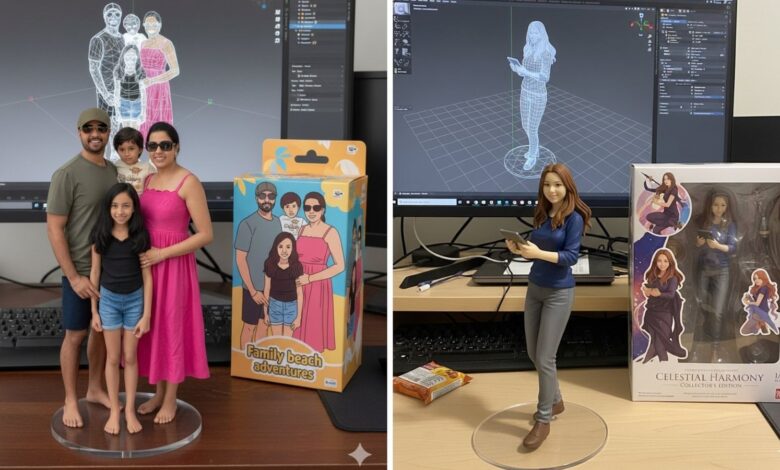

AI platforms are evolving swiftly, with each update fueling viral trends. The latest inclusion in that trend involves social media users using Google’s Nano Banana to turn photos into 3D figurines. The trend has captivated millions on Instagram and X, prompting many to show their creative output. Google Gemini posted these pictures on X under the Nano Banana 3D figurines trend. (X/@GeminiApp) What is the ‘Nano Banana 3D figurine’ trend?“From photo to figurine style in just one prompt. People are having fun turning their photos into images of custom miniature figures, thanks to nano-banana in Gemini. Try a pic of yourself, a cool nature shot, a family photo, or a shot of your pup,” reads a tweet from Google Gemini’s official X handle. The trend has grown rapidly because social media users can create visually impressive results using it with a few simple steps. Under this trend, people are generating miniature, lifelike figurines placed in realic settings. In addition, the figurines are placed on acrylic bases and kept beside detailed packaging mockups, generating a visual similar to how commercial collectable figures look. How to use ‘Nano Banana’ trend? A step–step guide:Step 1: Open Google Gemini, on your mobile app or website and login Step 2: Upload an image. HT.com used an image of a dog from a free photo platform to create a 3D figurine. Step 3: Once the image is uploaded, enter the prompt. Google Gemini also shared the best prompt to use on X. What prompt to use?“Create a 1/7 scale commercialized figurine of the characters in the picture, in a realic style, in a real environment. The figurine is placed on a computer desk. The figurine has a round transparent acrylic base, with no text on the base. The content on the computer screen is a 3D modeling process of this figurine. Next to the computer screen is a toy packaging box, designed in a style reminiscent of high-quality collectible figures, printed with original artwork. The packaging features two-dimensional flat illustrations.” Picture and prompt on Google Gemini. (Screengrab) Step 4: Click generate and wait for the AI tool to create a 3D figurine within seconds. If you are not satisfied, you can use personalised prompts to refine the result. Here’s the image HT.com generated using Google Gemini. Visual created using the viral ‘Nano Banana’ trend. (HT.com) Nano Banana tips and tricks:Use sharp, high-quality images for better results2. If you want your 3D figurine to look a certain way, be specific with your prompts 3. If you’re sharing your result on social media, use trending hashtags for more visibility Is Nano Banana free?Yes, Nano Banana is free to use. It is an AI image editor powered Gemini 2.5 Flash.